CamillaFIR DSP Guards Reference
CamillaFIR DSP Guards Reference
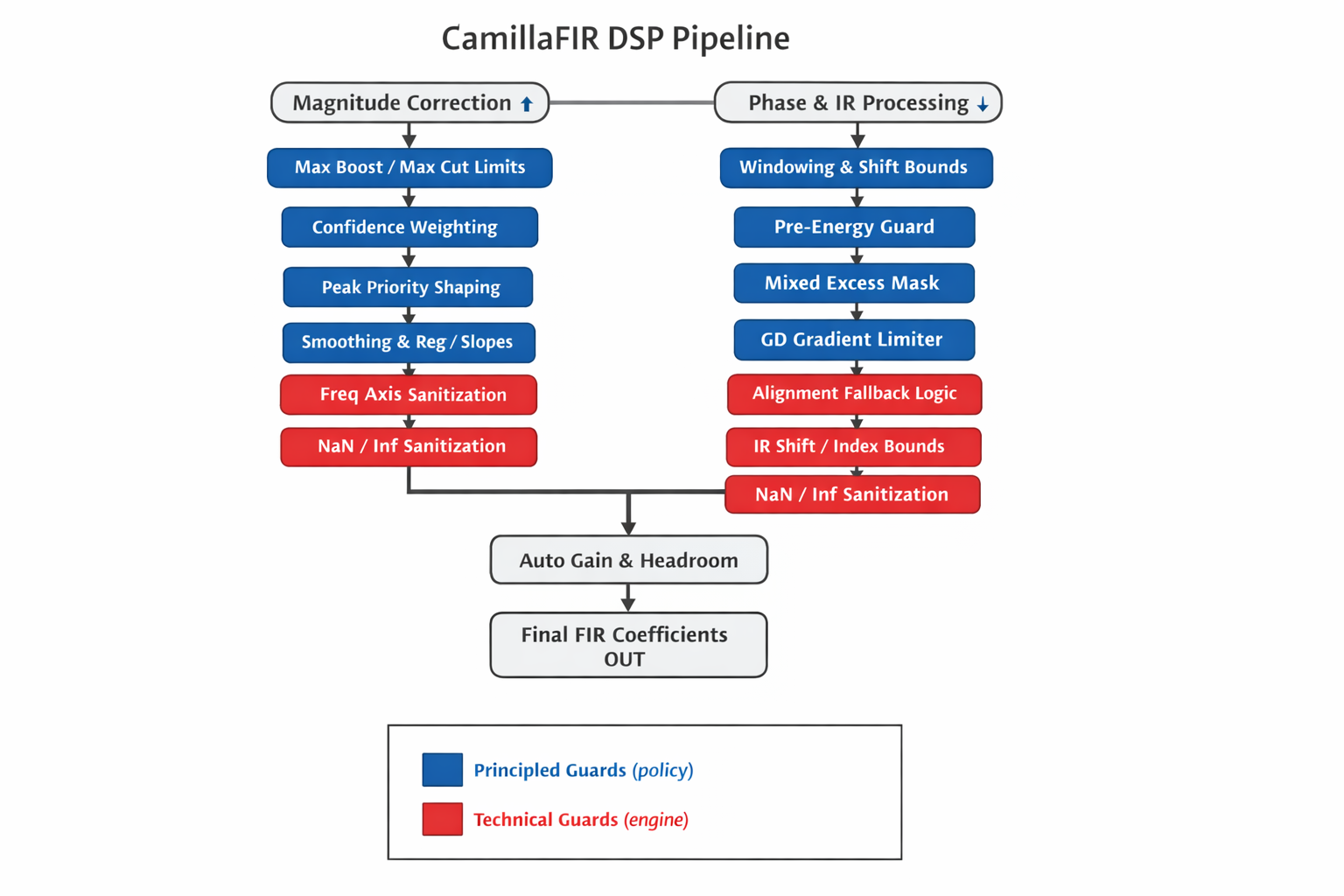
This document defines all major guard mechanisms in the DSP pipeline and classifies them as either:
- Principled Guard → Part of DSP philosophy (defines intended acoustic behavior)
- Technical Guard → Implementation safety mechanism (prevents instability, invalid math, or edge-case failure)
Each guard includes:
- Location (module level)
- Typical config keys (if applicable)
- Pipeline stage
- Why it exists (design intent)
- What failure it prevents (engineering perspective)
PRINCIPLED GUARDS
These define how CamillaFIR is intended to behave acoustically. They shape correction philosophy, realism, and robustness.
1. Mixed Excess Mask (LF-only phase blending)
Location: dsp_phase / mixed-phase logic Stage: Phase construction
Why: Restricts excess-phase correction primarily to low frequencies with a soft transition band.
Prevents:
- Unrealistic full-band phase manipulation
- Audible timing artifacts in mid/high frequencies
- Excessive group delay distortion
2. Pre-Energy / Pre-Ringing Guard
Location: dsp/phase_ir_guards.py Stage: Post phase-IR generation
Config (typical):
- enable_ir_pre_energy_guard
- pre_energy_ratio_max
- max_pre_ringing_db
Why: Limits excessive energy before the main impulse peak to preserve transient realism.
Prevents:
- Strong pre-ringing
- Non-physical impulse shapes
- Audible temporal smearing
3. Max Boost / Max Cut Limits
Location: dsp/correction_mag.py, dsp/limits.py Stage: Magnitude correction
Config (typical):
- max_boost_db
- max_cut_db
- bass_boost_cap_* (optional LF refinement)
Why: Prevents unrealistic amplification demands on the system.
Prevents:
- Clipping
- Driver overload
- Unrealistic correction into deep nulls
4. Peak Priority Shaping
Location: dsp/correction_mag.py Stage: Error shaping
Config (typical):
- peak_priority_enable
- peak_priority_strength
Why: Reduces boost into narrow dips/nulls where correction is physically ineffective.
Prevents:
- Aggressive null-filling
- Excessive localized boost
5. Regularization
Location: dsp/correction_mag.py Stage: Target shaping
Config (typical):
- reg_strength
Why: Globally pulls correction toward 0 dB to improve robustness.
Prevents:
- Over-aggressive full-band correction
- Excess reliance on hard caps
6. Smoothing (Magnitude Domain)
Location: dsp/correction_mag.py Stage: Target conditioning
Why: Smooths the correction curve to improve spatial robustness and perceptual stability.
Prevents:
- Sawtooth filters
- Overfitting to measurement noise
7. Confidence-Based Weighting / Target Pull
Location: dsp/correction_mag.py, dsp/camillafir_dsp.py Stage: Target blending
Config (typical):
- conf_floor / conf_ceil
- gamma_cut / gamma_boost
Why: Reduces correction strength in low-confidence regions.
Prevents:
- Overcorrection in unreliable measurement areas
- Excess boost in cancellation-dominated regions
8. Auto Headroom / Auto Gain
Location: dsp/phase_ir_autogain.py Stage: Final normalization
Config (typical):
- auto_headroom_enable
- auto_gain_spike_threshold_db
Why: Ensures safe global output level.
Prevents:
- Clipping after filter export
- Hidden overload caused by combined boosts
9. GD Gradient Limiter
Location: dsp/camillafir_dsp.py Stage: Phase-domain limiting
Why: Constrains extreme group delay slope (ms/octave), especially in LF.
Prevents:
- Unrealistic timing behavior
- Excessively steep excess-phase transitions
TECHNICAL GUARDS
These ensure numerical and structural stability. They must remain always-on and are not part of user-facing philosophy.
1. IR Shift / Alignment Bounds
Location: dsp/phase_ir_align.py Stage: IR alignment
Why: Prevents illegal impulse shifts beyond window boundaries.
Prevents:
- Lost impulse peaks
- Index overflow
- Truncated IR
2. Alignment Fallback Logic
Location: dsp/phase_ir_align.py Stage: Alignment target computation
Why: Ensures safe defaults if centroid/peak detection fails.
Prevents:
- Undefined alignment targets
- Broken timing
3. Window Auto-Asymmetry Cap
Location: dsp/phase_ir_window.py Stage: Windowing
Why: Limits extreme asymmetric window selections.
Prevents:
- Impulse truncation
- Edge instability
4. NaN / Inf Sanitization
Location: Multiple modules Stage: Throughout pipeline
Why: Ensures stable numerical behavior.
Prevents:
- FFT explosions
- Derivative instability
- Invalid magnitude/phase arrays
5. Frequency Axis Sanitization
Location: dsp_preprocess / dsp_correction Stage: Preprocessing
Why: Guarantees monotonic and unique frequency axis.
Prevents:
- Derivative math failure
- Interpolation instability
Dependency Map (Dominance Overview)
This section describes which mechanisms typically dominate when multiple guards affect the same risk.
Legend:
- A → B : If A is strong, B becomes mostly a safety net.
- A ⇄ B : Partial overlap or tuning interaction.
Boost / Headroom Cluster
Regularization → Peak Priority → Max Boost/Cut → Auto Headroom
Upstream shaping should reduce how often hard caps are needed.
Overfitting / Sawtooth Cluster
Smoothing → (reduces need for) Slope Limits Smoothing ⇄ Regularization Confidence Weighting ⇄ Regularization
Slope limiting should rarely dominate if smoothing is well tuned.
Mixed-Phase Stability Cluster
Mixed Excess Mask → (reduces need for) GD Gradient Limiter
If GD limiter activates frequently, the excess mask is too permissive.
Time-Domain Stability Cluster
Alignment Bounds → Window Cap → Pre-Energy Guard
If pre-energy guard activates often, upstream alignment/window policy should be revised.
Trigger Matrix (Operational Monitoring)
Healthy system expectations:
Often active but gentle:
- Confidence weighting
- Smoothing
- Regularization
- Auto headroom
Occasional safety nets:
- Max boost/cut
- Peak priority
- Alignment clamp
Rare last-resort guards:
- Slope limit
- Pre-energy guard
- GD gradient limiter
- Spike guard
- NaN sanitization
If a rare guard triggers frequently, treat it as an upstream design issue rather than a tuning feature.
Design Rule
Principled guards define intended acoustic behavior. Technical guards ensure mathematical and structural stability.
Principled guards may be user-adjustable. Technical guards must never be disabled.
1. Overview
Disclaimer
AI was used to translate this document from Finnish to English.